

C
AmberCutie's Forum
An adult community for cam models and members to discuss all the things!
-
** WARNING - ACF CONTAINS ADULT CONTENT **Only persons aged 18 or over may read or post to the forums, without regard to whether an adult actually owns the registration or parental/guardian permission. AmberCutie's Forum (ACF) is for use by adults only and contains adult content. By continuing to use this site you are confirming that you are at least 18 years of age.
You are using an out of date browser. It may not display this or other websites correctly.
You should upgrade or use an alternative browser.
You should upgrade or use an alternative browser.




Patch Notes: June 2026
Fresh updates have landed on the platform. From February to April we shipped a few new features and cleared out some bugs you reported:
-Models can now set custom prices for each Fan Club tier: Soldier, Lord, and Prince.
-Studios can change their username, just like individual models.
-Fan Club earnings show only the subscriptions paid in the current month, so the amount is accurate.
-Models no longer stay hidden in a region after removing it from their geo-block settings.
-Ticket and Group shows now start even when page translation is enabled.
Read the full Patch Notes on our blog: https://stripchat.com/blog/stripchat-patch-notes-june-2026/
Fresh updates have landed on the platform. From February to April we shipped a few new features and cleared out some bugs you reported:
-Models can now set custom prices for each Fan Club tier: Soldier, Lord, and Prince.
-Studios can change their username, just like individual models.
-Fan Club earnings show only the subscriptions paid in the current month, so the amount is accurate.
-Models no longer stay hidden in a region after removing it from their geo-block settings.
-Ticket and Group shows now start even when page translation is enabled.
Read the full Patch Notes on our blog: https://stripchat.com/blog/stripchat-patch-notes-june-2026/
Upvote
0
Amazon Wishlists are back!
Amazon Wishlist links are back with a required consent step.
You can once again share your wishlist with fans and receive gifts. To make sure you stay informed, a consent step is now required before you add your link.
Amazon may disclose your delivery address to third parties, including gift buyers. So, before sharing your wishlist, you’ll need to confirm that you acknowledge a potential privacy risk.
To add your Amazon Wishlist:

Amazon Wishlist links are back with a required consent step.
You can once again share your wishlist with fans and receive gifts. To make sure you stay informed, a consent step is now required before you add your link.
Amazon may disclose your delivery address to third parties, including gift buyers. So, before sharing your wishlist, you’ll need to confirm that you acknowledge a potential privacy risk.
To add your Amazon Wishlist:
- Go to My Profile
- Paste your link into the Amazon Wishlist field
- Check the privacy notice box
- Save your changes
Upvote
0
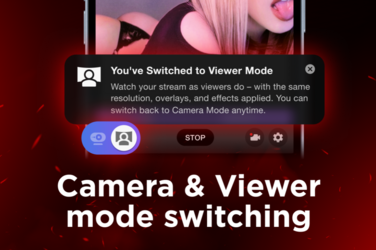
See Your Stream the Way Viewers Do, Even via OBS
Want to see your stream exactly as viewers do? Now you can switch to Viewer mode during your live show in real time.
Whether you broadcast directly from the site or stream via OBS, Viewer mode shows your stream from the user's perspective. So even if you're running an external software, you'll see exactly what your audience sees. No second device, no guesswork.
This way, you can review how your stream looks and easily spot technical issues while you’re live. Toggle between Camera mode (your own view) and Viewer mode anytime.
How to use it:
- Start your live stream
- Go to the bottom left corner of your camera window
- Click the Viewer mode icon with a person and a screen to switch views
Try Viewer mode in your next show to stay in control of the stream quality and fine-tune your performance.
Want to see your stream exactly as viewers do? Now you can switch to Viewer mode during your live show in real time.
Whether you broadcast directly from the site or stream via OBS, Viewer mode shows your stream from the user's perspective. So even if you're running an external software, you'll see exactly what your audience sees. No second device, no guesswork.
This way, you can review how your stream looks and easily spot technical issues while you’re live. Toggle between Camera mode (your own view) and Viewer mode anytime.
How to use it:
- Start your live stream
- Go to the bottom left corner of your camera window
- Click the Viewer mode icon with a person and a screen to switch views
Try Viewer mode in your next show to stay in control of the stream quality and fine-tune your performance.
Upvote
0
Help Protect Your Viewers From Free Token Scams
Your viewers trust you, and that trust is one of the most valuable things you build as a creator.
That's why LoveLillyy has teamed up with Stripchat to tackle one of the biggest scams affecting our community. In our latest YouTube video, she explains how fake token generators and scam websites work, the warning signs to look out for, and how users can protect themselves.
If your viewers ever ask about free Stripchat tokens, this is the video to share.
The only legitimate way for them to get free Stripchat tokens is through the hourly draw on Stripchat. If a website, video or app tells users otherwise, it's a scam.
 Watch the full video on our YouTube channel, then share it with your community to help keep your fans safe.
 Together, we can help protect more fans from scams.


Upvote
0
Your Top Model Ranking Just Got a Glow-Up
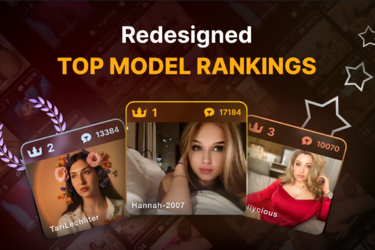
We reimagined the Top Model rankings to give higher positions even more recognition. Every step up carries more meaning and makes your climb feel much more rewarding.
Last year, we expanded the Top Model ranking from 100 to 1000 positions. Now, it’s time to give the ranking a fresh look.
Following your feedback, we redesigned the Top Model page to better reflect the status of your place.
The monthly leaderboards for each category have a new visual structure that brings more distinction to the top. Instead of one long list, positions are now grouped into tiers.
You can see the new design on the Current Month Top and Last Month Winners pages across all genders. The new groups are:
- Winners: positions 1–3
- Top Performers: positions 4–20
- Top 100: positions 21–100
- Top 1000: positions 101+
Go to the Top Models page, find your tier, and set your sights on the next one. We’re rooting for you.
Upvote
0
Help Protect Your Viewers From Free Token Scams
Your viewers trust you, and that trust is one of the most valuable things you build as a creator.
That's why LoveLillyy has teamed up with Stripchat to tackle one of the biggest scams affecting our community. In our latest YouTube video, she explains how fake token generators and scam websites work, the warning signs to look out for, and how users can protect themselves.
If your viewers ever ask about free Stripchat tokens, this is the video to share.
The only legitimate way for them to get free Stripchat tokens is through the hourly draw on Stripchat. If a website, video or app tells users otherwise, it's a scam.
Together, we can help protect more fans from scams.
View attachment 107119
If they are stupid enough to fall for this scam they deserve it. Account hacked and used to attempt scamming others. But what is funny when I report someone for selling tokens off site by using the "report" button on the message they post in the chat nothing happens to them. I have reported one in a room then about 10 minutes later went to another room and the same account was in this room spamming for off site tokens.
Upvote
0
 .
.
Updated Community Guidelines: Clearer Guidance for Real Streaming Situations
We’ve updated the Community Guidelines to make them clearer, more transparent, and easier to use in everyday streaming situations.
We know it isn’t always easy to understand how a rule applies to a specific moment on camera. The updated Guidelines include clearer explanations and brand-new enforcement notes for relevant policy areas. These notes answer questions we hear most often.
Alongside these practical explanations, the update highlights a key principle behind moderation: context matters. We review the whole situation rather than isolated words, objects, or moments in a broadcast. A single unverified report does not trigger enforcement on its own.
Read the updated Community Guidelines to get a better sense of the platform’s boundaries and what to expect from moderation: https://support.stripchat.com/hc/en-us/articles/4410728017553-Stripchat-Community-Guidelines
We’ve updated the Community Guidelines to make them clearer, more transparent, and easier to use in everyday streaming situations.
We know it isn’t always easy to understand how a rule applies to a specific moment on camera. The updated Guidelines include clearer explanations and brand-new enforcement notes for relevant policy areas. These notes answer questions we hear most often.
Alongside these practical explanations, the update highlights a key principle behind moderation: context matters. We review the whole situation rather than isolated words, objects, or moments in a broadcast. A single unverified report does not trigger enforcement on its own.
Read the updated Community Guidelines to get a better sense of the platform’s boundaries and what to expect from moderation: https://support.stripchat.com/hc/en-us/articles/4410728017553-Stripchat-Community-Guidelines
Upvote
0
Magic Search is now unlimited for everyone on Stripchat, guests included!
That means more people can find your room by describing what they want to see.
They type it in their own words, in any of more than 50 languages, and Magic Search shows the live rooms that match.
Being different can make you easier to find. A distinctive outfit, setup, or look can get you discovered even when no category fits it. One user just has to describe it. And users who come looking for something specific are more likely to stay and tip than those who are just browsing.
Your tags and categories still work as before. Magic Search is one more way for users to find you.
Our computer vision technology matches what’s visible in your stream. If your outfit, toys, or tattoos are in the frame, users who describe them can find you. The more particular your show, the more Magic Search works in your favor.
This is just the start. Our product team will keep improving Magic Search!

That means more people can find your room by describing what they want to see.
They type it in their own words, in any of more than 50 languages, and Magic Search shows the live rooms that match.
Being different can make you easier to find. A distinctive outfit, setup, or look can get you discovered even when no category fits it. One user just has to describe it. And users who come looking for something specific are more likely to stay and tip than those who are just browsing.
Your tags and categories still work as before. Magic Search is one more way for users to find you.
Our computer vision technology matches what’s visible in your stream. If your outfit, toys, or tattoos are in the frame, users who describe them can find you. The more particular your show, the more Magic Search works in your favor.
This is just the start. Our product team will keep improving Magic Search!
Upvote
0
Keep Unwanted Messages Out of Your Chat with Up to 300 Blocked Words & Phrases
We’ve increased the limit for Blocked Words & Phrases from 30 to 300. Use the extra room to manage your chat on your terms and make it feel safer.
Focus on your stream without worrying about unwanted content cluttering up your chat. Messages containing a word or phrase on your list are hidden from chat participants.
To add a word or phrase:
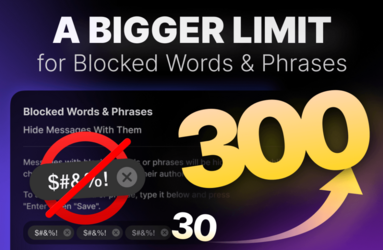
We’ve increased the limit for Blocked Words & Phrases from 30 to 300. Use the extra room to manage your chat on your terms and make it feel safer.
Focus on your stream without worrying about unwanted content cluttering up your chat. Messages containing a word or phrase on your list are hidden from chat participants.
To add a word or phrase:
- Go to Settings → Privacy
- Scroll to Blocked Words & Phrases
- Enter a word or phrase in the dedicated field and press Enter
- Click Save
Upvote
0
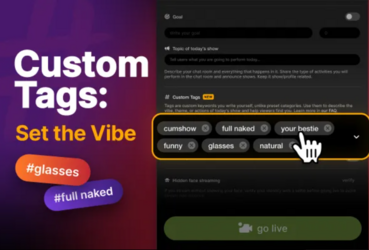
Custom Tags: your show, in your words
A birthday celebration, a playful mood, something a little more “horny”. Whatever you have planned, Custom Tags give you more freedom to describe today’s show and help viewers find it, in any language.
How to add them:
Click Start Show
Enter your tags in the dedicated field. Create your own or choose from the suggestions
Click Go Live
You can add up to 7 tags, each up to 25 characters long, and update or remove them before your broadcast starts.
Make your tags count
Custom Tags complement categories. Existing category and activity names can’t be used as tags, so choose keywords that add more detail about your show. If a tag matches a category or activity, try rephrasing it.
The more creative and varied your tags, the better your chances of getting noticed. See our FAQ for the full tag rules: https://support.stripchat.com/hc/en-us/articles/48255893485457-Custom-Tags-How-to-Use-Them
A birthday celebration, a playful mood, something a little more “horny”. Whatever you have planned, Custom Tags give you more freedom to describe today’s show and help viewers find it, in any language.
How to add them:
Click Start Show
Enter your tags in the dedicated field. Create your own or choose from the suggestions
Click Go Live
You can add up to 7 tags, each up to 25 characters long, and update or remove them before your broadcast starts.
Make your tags count
Custom Tags complement categories. Existing category and activity names can’t be used as tags, so choose keywords that add more detail about your show. If a tag matches a category or activity, try rephrasing it.
The more creative and varied your tags, the better your chances of getting noticed. See our FAQ for the full tag rules: https://support.stripchat.com/hc/en-us/articles/48255893485457-Custom-Tags-How-to-Use-Them
Upvote
0
This is a cool feature (especially when combined with the magic search enhancements) and i am already seeing models coming up with some cool tags. There are lots of things that segments of users like that are sort of hard to find through the categories and these can help - lots of guys like obvious plastic surgery for example, and there is no category for that. I find ear gauges sexy, but no category for that (maybe too small an interest area).Custom Tags: your show, in your words
A birthday celebration, a playful mood, something a little more “horny”. Whatever you have planned, Custom Tags give you more freedom to describe today’s show and help viewers find it, in any language.
How to add them:
Click Start Show
Enter your tags in the dedicated field. Create your own or choose from the suggestions
Click Go Live
You can add up to 7 tags, each up to 25 characters long, and update or remove them before your broadcast starts.
Make your tags count
Custom Tags complement categories. Existing category and activity names can’t be used as tags, so choose keywords that add more detail about your show. If a tag matches a category or activity, try rephrasing it.
The more creative and varied your tags, the better your chances of getting noticed. See our FAQ for the full tag rules: https://support.stripchat.com/hc/en-us/articles/48255893485457-Custom-Tags-How-to-Use-Them
View attachment 108205
Is there a way to highlight models using custom tags to encourage adoption? Adding maybe 3+ gets you on a page, just like if yiu searched a category or characteristic? Maybe show trending custom tags for ones that are being added by several models?
Upvote
0

I like part of the Private Messages change but I hate how you have removed the "archived messages" from the bottom to a hidden location with extra clicks. Why did you guys do this? It was great and fine in the place it was before - the bottom of messages.
Now it doesn't show any kind of notification that i have new message requests, I literally have to go and look myself to see if the number has increased. Please change it back.
Now it doesn't show any kind of notification that i have new message requests, I literally have to go and look myself to see if the number has increased. Please change it back.
Upvote
0

I like part of the Private Messages change but I hate how you have removed the "archived messages" from the bottom to a hidden location with extra clicks. Why did you guys do this? It was great and fine in the place it was before - the bottom of messages.
Now it doesn't show any kind of notification that i have new message requests, I literally have to go and look myself to see if the number has increased. Please change it back.
I agree. They’re buried.
They’re doing loads of UI testing at the moment - I went online the other day (on mobile) and the left-hand room menu was across the top, then randomly was on the left again about an hour later.
…and those new significantly distracting tip animations… my eyes should be drawn to the model not some wiggly animation in mobile chat.
We’ll moan but we’ll get used to it!
Upvote
0
I'm having a problem with the tags. I cannot add them. Here is what happened:Custom Tags: your show, in your words
A birthday celebration, a playful mood, something a little more “horny”. Whatever you have planned, Custom Tags give you more freedom to describe today’s show and help viewers find it, in any language.
How to add them:
Click Start Show
Enter your tags in the dedicated field. Create your own or choose from the suggestions
Click Go Live
You can add up to 7 tags, each up to 25 characters long, and update or remove them before your broadcast starts.
Make your tags count
Custom Tags complement categories. Existing category and activity names can’t be used as tags, so choose keywords that add more detail about your show. If a tag matches a category or activity, try rephrasing it.
The more creative and varied your tags, the better your chances of getting noticed. See our FAQ for the full tag rules: https://support.stripchat.com/hc/en-us/articles/48255893485457-Custom-Tags-How-to-Use-Them
View attachment 108205
I was doing some edits to my stream and testing some things on the day these tags were released. I clicked "Start Show" and saw the option to add tags, but since my goal and room title were "testing my stream" I didn't add any tags, and instead clicked "Go Live".
Ever since that day, when I click "start stream" the stream INSTANTLY starts. I don't ever get to see the page that says "select your stream specifics" anymore. I no longer have to press the button to "Go Live". This screen simply doesn't show and the stream just starts. So I am unable to add the tags. I searched throughout my settings for another way to add them and I cannot find it.
What do I do here? I would like to add some tags please. @Stella_SC
Upvote
0

I think i only get that screen once a day, hope someone knows a way though.I'm having a problem with the tags. I cannot add them. Here is what happened:
I was doing some edits to my stream and testing some things on the day these tags were released. I clicked "Start Show" and saw the option to add tags, but since my goal and room title were "testing my stream" I didn't add any tags, and instead clicked "Go Live".
Ever since that day, when I click "start stream" the stream INSTANTLY starts. I don't ever get to see the page that says "select your stream specifics" anymore. I no longer have to press the button to "Go Live". This screen simply doesn't show and the stream just starts. So I am unable to add the tags. I searched throughout my settings for another way to add them and I cannot find it.
What do I do here? I would like to add some tags please. @Stella_SC
Upvote
0

Yes that is my impression of it too. Or maybe another time during the same day if there has been several hours since I closed the last stream.I think i only get that screen once a day, hope someone knows a way though.
Upvote
0
It used to be like that for me too, once per day. Now I don't see it at all.I think i only get that screen once a day, hope someone knows a way though.

Upvote
0
Ok that is weirdIt used to be like that for me too, once per day. Now I don't see it at all.
 hope someone can fix it! Maybe clear cache or with a different browser?
Upvote
0
I tried clearing the cache, but I didn't try a different browser. I'll check on that later todayOk that is weird
Upvote
0
Patch notes: October 2026
Here’s what changed from May to August 2026. Many updates started with your feedback shared.
Thanks for helping us improve Stripchat
What’s improved
- Top Models rankings: Separate Top 100 and Top 1000 tiers make ranking positions more distinct.
- Picture-in-picture: Keep your stream visible while browsing.
- Fan Club discounts: We tested clearer Public chat messages highlighting Fan Club benefits for users who haven’t subscribed.
- Viewer Mode: See your stream as viewers do, including pixelization.
- Ticket show refunds: You’ll receive a notice before stopping a Public show or canceling an upcoming Ticket show. Ticket holders get automatic refunds.
- Admin messages: Unread admin messages stay pinned at the top of your inbox.
- Recently uploaded: Models and users can hide unwanted content in Messenger.
- Indian language categories: Added Hindi, Bengali, Telugu, Marathi, Tamil, Gujarati, Kannada, Odia, Malayalam, Punjabi, and Assamese to All Categories, with updated descriptions.
- Interface languages: Hebrew and Bulgarian are now available.
- Other improvements: Reduced stream lag, created a category page for The Handy, added missing Private activity translations, and more.
What’s fixed
- Accounts with guys and girls appear in the correct gender category based on the selected streamer.
- Videos open correctly through direct links.
- Fan Club subscription buttons work after returning from Buy Tokens.
- MKV videos get uploaded without errors.
For a closer look at all the updates, read the full patch notes on our blog (https://stripchat.com/blog/stripchat-patch-notes-october-2026/)

Here’s what changed from May to August 2026. Many updates started with your feedback shared.
Thanks for helping us improve Stripchat
What’s improved
- Top Models rankings: Separate Top 100 and Top 1000 tiers make ranking positions more distinct.
- Picture-in-picture: Keep your stream visible while browsing.
- Fan Club discounts: We tested clearer Public chat messages highlighting Fan Club benefits for users who haven’t subscribed.
- Viewer Mode: See your stream as viewers do, including pixelization.
- Ticket show refunds: You’ll receive a notice before stopping a Public show or canceling an upcoming Ticket show. Ticket holders get automatic refunds.
- Admin messages: Unread admin messages stay pinned at the top of your inbox.
- Recently uploaded: Models and users can hide unwanted content in Messenger.
- Indian language categories: Added Hindi, Bengali, Telugu, Marathi, Tamil, Gujarati, Kannada, Odia, Malayalam, Punjabi, and Assamese to All Categories, with updated descriptions.
- Interface languages: Hebrew and Bulgarian are now available.
- Other improvements: Reduced stream lag, created a category page for The Handy, added missing Private activity translations, and more.
What’s fixed
- Accounts with guys and girls appear in the correct gender category based on the selected streamer.
- Videos open correctly through direct links.
- Fan Club subscription buttons work after returning from Buy Tokens.
- MKV videos get uploaded without errors.
For a closer look at all the updates, read the full patch notes on our blog (https://stripchat.com/blog/stripchat-patch-notes-october-2026/)
Upvote
0

Btw, what was that cam2voice request in blue (instead of exclusive in uh… yellow?) that i had yesterday? I really liked knowing what to expect. But 2 questions: could the customer still type? (Mine didnt and i didnt ask), could he still add his cam at one point? (Mine didnt but with a clear request text of ‚you can hear him but not see‘ it sounds like it would not be possible to add video at a later point? To everyone wondering: was still paid the normal exclusive rate and he left early and i still got my minimum minutes paid. So really just the visuals changed in the requestPatch notes: October 2026
Here’s what changed from May to August 2026. Many updates started with your feedback shared.
Thanks for helping us improve Stripchat
What’s improved
- Top Models rankings: Separate Top 100 and Top 1000 tiers make ranking positions more distinct.
- Picture-in-picture: Keep your stream visible while browsing.
- Fan Club discounts: We tested clearer Public chat messages highlighting Fan Club benefits for users who haven’t subscribed.
- Viewer Mode: See your stream as viewers do, including pixelization.
- Ticket show refunds: You’ll receive a notice before stopping a Public show or canceling an upcoming Ticket show. Ticket holders get automatic refunds.
- Admin messages: Unread admin messages stay pinned at the top of your inbox.
- Recently uploaded: Models and users can hide unwanted content in Messenger.
- Indian language categories: Added Hindi, Bengali, Telugu, Marathi, Tamil, Gujarati, Kannada, Odia, Malayalam, Punjabi, and Assamese to All Categories, with updated descriptions.
- Interface languages: Hebrew and Bulgarian are now available.
- Other improvements: Reduced stream lag, created a category page for The Handy, added missing Private activity translations, and more.
What’s fixed
- Accounts with guys and girls appear in the correct gender category based on the selected streamer.
- Videos open correctly through direct links.
- Fan Club subscription buttons work after returning from Buy Tokens.
- MKV videos get uploaded without errors.
For a closer look at all the updates, read the full patch notes on our blog (https://stripchat.com/blog/stripchat-patch-notes-october-2026/)
View attachment 108232
Upvote
0
Similar threads
- Replies
- 2
- Views
- 266
- Replies
- 1
- Views
- 221

- Replies
- 1
- Views
- 188

- Locked
- Solved
- Replies
- 60
- Views
- 3K

