
AmberCutie's Forum
An adult community for cam models and members to discuss all the things!

Stripchat: Latest News, New Features & Important Updates

  • ** WARNING - ACF CONTAINS ADULT CONTENT **
    Only persons aged 18 or over may read or post to the forums, without regard to whether an adult actually owns the registration or parental/guardian permission. AmberCutie's Forum (ACF) is for use by adults only and contains adult content. By continuing to use this site you are confirming that you are at least 18 years of age.

Patch Notes: June 2026

Fresh updates have landed on the platform. From February to April we shipped a few new features and cleared out some bugs you reported:

-Models can now set custom prices for each Fan Club tier: Soldier, Lord, and Prince.
-Studios can change their username, just like individual models.
-Fan Club earnings show only the subscriptions paid in the current month, so the amount is accurate.
-Models no longer stay hidden in a region after removing it from their geo-block settings.
-Ticket and Group shows now start even when page translation is enabled.

Read the full Patch Notes on our blog: https://stripchat.com/blog/stripchat-patch-notes-june-2026/

1783026502647.png
 
  • Like
Reactions: NotYou
Upvote 0
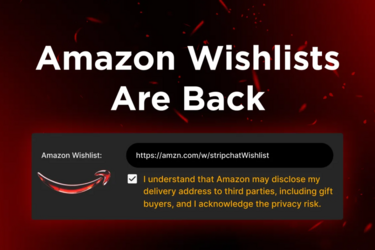
Amazon Wishlists are back!

Amazon Wishlist links are back with a required consent step.

You can once again share your wishlist with fans and receive gifts. To make sure you stay informed, a consent step is now required before you add your link.

Amazon may disclose your delivery address to third parties, including gift buyers. So, before sharing your wishlist, you’ll need to confirm that you acknowledge a potential privacy risk.

To add your Amazon Wishlist:
  1. Go to My Profile
  2. Paste your link into the Amazon Wishlist field
  3. Check the privacy notice box
  4. Save your changes
Note that if you do not accept the privacy notice, your wishlist link will remain hidden. This update keeps the feature available while giving you clear control over your privacy.

Amazonback.png
 
Upvote 0
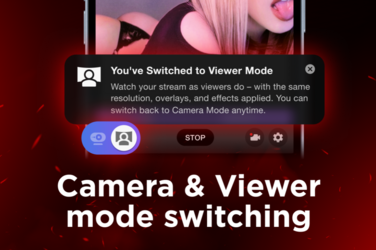
See Your Stream the Way Viewers Do, Even via OBS

Want to see your stream exactly as viewers do? Now you can switch to Viewer mode during your live show in real time.

Whether you broadcast directly from the site or stream via OBS, Viewer mode shows your stream from the user's perspective. So even if you're running an external software, you'll see exactly what your audience sees. No second device, no guesswork.

This way, you can review how your stream looks and easily spot technical issues while you’re live. Toggle between Camera mode (your own view) and Viewer mode anytime.

How to use it:
- Start your live stream
- Go to the bottom left corner of your camera window
- Click the Viewer mode icon with a person and a screen to switch views

Try Viewer mode in your next show to stay in control of the stream quality and fine-tune your performance.

1783609806289.png
 
Upvote 0