
AmberCutie's Forum
An adult community for cam models and members to discuss all the things!

PSA - Skype update and "suggesting" friends

  • ** WARNING - ACF CONTAINS ADULT CONTENT **
    Only persons aged 18 or over may read or post to the forums, without regard to whether an adult actually owns the registration or parental/guardian permission. AmberCutie's Forum (ACF) is for use by adults only and contains adult content. By continuing to use this site you are confirming that you are at least 18 years of age.
Status
Not open for further replies.
Apr 19, 2013
70
149
113
Hello,

Maybe Skype has done this for a while using other apps, but the most recent desktop app has to me a major privacy concern.

When adding contacts, there is a suggested contacts now showing how many mutual friends you have. A general usecase, I only have 1 friend added on a certain account. So now I know who they have added on theirs!

Really wish companies would stop doing this, especially for things where for years it use to be private information.
 
I am going to watch the replies.
How do we turn that option off?

Dear Skype,
I don't want you to suggest friends to me because I don't want friends from a robotic algorithm acting like it knows what's best for my social life.
Sincerely,
Every antisocial, small-circle keeper ever
 
  • Like
Reactions: DejaElectra
Hello,

Maybe Skype has done this for a while using other apps, but the most recent desktop app has to me a major privacy concern.

When adding contacts, there is a suggested contacts now showing how many mutual friends you have. A general usecase, I only have 1 friend added on a certain account. So now I know who they have added on theirs!

Really wish companies would stop doing this, especially for things where for years it use to be private information.

Are you using the desktop app or the windows 10 store app? The store app is connected to the windows 10 data collection so NEVER use it unless you want skype to build associations. Also don't install skype on the phone and give it permissions by default. You can open up it's permissions later if needed but it tends to hoover your contacts on first install for both android and iphone. Oh and remove that skype 'click to call' browser extension.

Generally if you use the desktop app with a separated skype account (non MS account) it doesn't seem to know or care outside of your existing skype contacts.
 
  • Helpful!
Reactions: Gen and MarinaThyme
It is actually the desktop app, they updated it today (so it is more like the mobile app). There is actually a setting to prevent your name from being suggested (on by default, such a surprise).

I think this hits home the bigger point though, you always need to make sure to keep everything completely separate as both a member and model. The account I only have 1 friend on, I can clearly see other member's names and from what I know of them it appears to be their real first and last names.
 
I'm using the latest version of the desktop app and it's never suggested anything. My version is 7.40.0.151 for the desktop. If youre number does not match this you might be using the app version. The App version is loaded by default on win 10 machines. If you need to make double sure goto here https://www.skype.com/en/get-skype/ on the drop down choose 'get classic skype'.

If you're seeing first and last names of anyone then you're skype has either be connected to an MS account or your contact list has been hoovered by the phone app. All I see on my skype are skype usernames or people I've aliased myself and I've had my account for 8+ years.

You may want to write off that account and roll yourself a new one. Just tell the people that matter to you that you're switching. Models do this all the time. CMD models almost do it too much lol.
 
All of these communication apps are doing this now, and even more so on the phones than just desktops. The downside is that they give you no option to block notification you've joined or stated the app until you've logged on. Even worse, some send notification that you've signed up to those on your contact list (or if you're on theirs) and the username.
 
I'm using the latest version of the desktop app and it's never suggested anything. My version is 7.40.0.151 for the desktop. If youre number does not match this you might be using the app version. The App version is loaded by default on win 10 machines. If you need to make double sure goto here https://www.skype.com/en/get-skype/ on the drop down choose 'get classic skype'.

If you're seeing first and last names of anyone then you're skype has either be connected to an MS account or your contact list has been hoovered by the phone app. All I see on my skype are skype usernames or people I've aliased myself and I've had my account for 8+ years.

You may want to write off that account and roll yourself a new one. Just tell the people that matter to you that you're switching. Models do this all the time. CMD models almost do it too much lol.

Mine was on the 7 build, but when I logged in this morning it updated to the 8 build (which is when I noticed this). It looks like they are the contacts of your friends to suggest because I never linked it to my phone or anything else.

I have had Skype for about just as long, your skype will eventually update to this version (which totally changes the user interface to look more like the Windows 10 app version)
 
Mine was on the 7 build, but when I logged in this morning it updated to the 8 build (which is when I noticed this). It looks like they are the contacts of your friends to suggest because I never linked it to my phone or anything else.

I have had Skype for about just as long, your skype will eventually update to this version (which totally changes the user interface to look more like the Windows 10 app version)

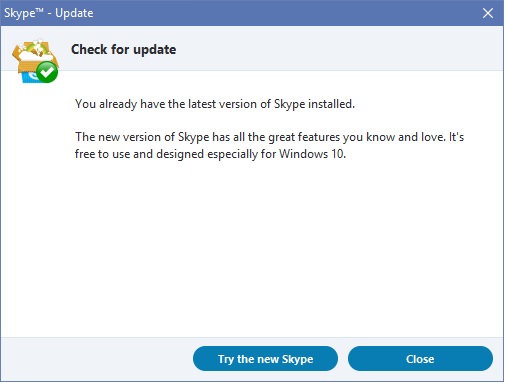
7 is the latest classic build. If you are on 8 then you're on the win 10 app again. Make sure to read the update message before you accept these updates.

bGAALpN.jpg


You probably need to uninstall now and reinstall the classic build which will put you back down to 7.
 
I didn't accept any updates, Skype did the thing it usually does when updating. (Closed my skype window and started updating itself). Anyways, the point is, it still allows you to pry into other people's contact list via the suggested contacts
 
Status
Not open for further replies.