I'm not good at giving directions, but I'll try. Lol. Or just link you to other How To's.

If it's a photo stored on my laptop, I'd just open up that photo to use my laptop's built-in photo gallery's editor/resizer...click the three white dots icon at the top (to open a menu)...then click 'Resize Image', and decrease the pixel sizes to lower numbers. Then save it. You'd be able to show your entire photo that way, if you just shrunk it down a bit with whatever pixel size would be ideal.
Since it's a photo on your phone (I still have an "old" iPhone 11), what I would do in your case if I was just trying to change it to a head and shoulders pic...
Go into your phones photos app to open up the photo you want to use.
Tap the three blue dots at the top right corner to open that menu...then click Duplicate (so you have another copy of this photo in its original form).
Continuing with your photo, tap the three blue horizontal lines at the bottom.
Tap on Crop. Then use your finger to slide the box lines around 'til it's more zoomed in on your head and shoulders.
Click 'Done,' and then it's saved. You can use this to upload it to your profile, while still keeping the other original photo (with your full body) for yourself.
If you decide to go the route of the aspect ratio (changing the dimensions of the photo):.
Learn how to resize images directly on your iPhone without a computer Do you have an image on your iPhone that you need to make larger or smaller? You can easily crop photos in the Photos app or change the image dimensions or compress the...

www.wikihow.com
(^This one is just about iPhones. I don't know anything about Androids.)
Share with Friends:Whether you’re trying to save storage space, upload a picture faster, or meet size requirements for a specific app or website, resizing photos on your Android device is a quick and simple process. This article will walk you through each step to resize your images using your...

dtptips.com
(This one is for Android)
Remember for MFC the maximum file size you can upload is 8 MB. To give you sort of an idea, when you upload a photo here to ACF as your avatar photo, it recommends you use an image that's at least 400 x 400 pixels. My current ACF avatar photo (which also happens to be my current MFC avatar)...it says the resolution (dimensions) is 384 x 384 pixels. And the size is 184.4 KB.


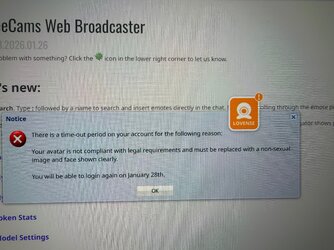






 So i changed for only face photo and they accepted. But before, after i wrote them why they are so strict they banned me


