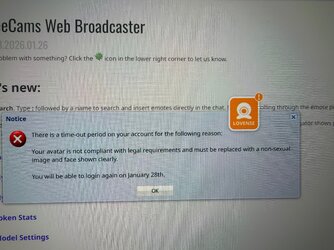
I did that yes. and so I just uploaded a whole new pic and it is my profile pic now but they refuse to lift the suspend since it’s only one day. They said I have to have the whole top of my head showing but the pic cropped when I loaded it I have no clue what the fuckI know I responded in your other thread about it, but I’ll jump in again since we do not have any MFC reps here.
You said you just upload the exact same pic every time. I’d suggest trying a completely different pic of just your face and see if that stops the daily warnings about it.
Oh well at least they gave you a reason. Edit a new pic so that the top doesn't crop off and I bet you’ll be golden.I did that yes. and so I just uploaded a whole new pic and it is my profile pic now but they refuse to lift the suspend since it’s only one day. They said I have to have the whole top of my head showing but the pic cropped when I loaded it I have no clue what the fuck
I did that yes. and so I just uploaded a whole new pic and it is my profile pic now but they refuse to lift the suspend since it’s only one day. They said I have to have the whole top of my head showing but the pic cropped when I loaded it I have no clue what the fuck

I wish there was a Phone support team for every cam site.I also had this problem. My profile was soft, it was showing my body and a bit stomach hah looks like showing stomach was too nastySo i changed for only face photo and they accepted. But before, after i wrote them why they are so strict they banned me
So i wrote wtf and they said they will reverse ban if i will accept their new policy . Deamn i wasnt " not accepting this", just wrote mail where i said how weird is this for me and that other pages are not so strict. So i said i accept, changed photo only for face and now is ok
I have never in my life ever resized a pic or know how to. I have always loaded from my camera on my phone and hope it just is the right size and Streamate had same issue last year with size they cut everyone’s profile pics in half. Everyone else fixed theirs and mine is still just half my face.MFC Model Support for models only can be reached at: models@myfreecamsmail.com.
This sounds like an easy fix...whether you have to just resize/save your photo so that it's a tad smaller, but doesn't exceed 8 MB...or just upload a photo showing you from your head to your neck/shoulders (kinda like my current ACF avatar photo on here..lol).
View attachment 105242
I have never in my life ever resized a pic or know how to. I have always loaded from my camera on my phone and hope it just is the right size and Streamate had same issue last year with size they cut everyone’s profile pics in half. Everyone else fixed theirs and mine is still just half my face.
Thank You!!I'm not good at giving directions, but I'll try. Lol. Or just link you to other How To's.
If it's a photo stored on my laptop, I'd just open up that photo to use my laptop's built-in photo gallery's editor/resizer...click the three white dots icon at the top (to open a menu)...then click 'Resize Image', and decrease the pixel sizes to lower numbers. Then save it. You'd be able to show your entire photo that way, if you just shrunk it down a bit with whatever pixel size would be ideal.
Since it's a photo on your phone (I still have an "old" iPhone 11), what I would do in your case if I was just trying to change it to a head and shoulders pic...
Go into your phones photos app to open up the photo you want to use.
Tap the three blue dots at the top right corner to open that menu...then click Duplicate (so you have another copy of this photo in its original form).
Continuing with your photo, tap the three blue horizontal lines at the bottom.
Tap on Crop. Then use your finger to slide the box lines around 'til it's more zoomed in on your head and shoulders.
Click 'Done,' and then it's saved. You can use this to upload it to your profile, while still keeping the other original photo (with your full body) for yourself.
If you decide to go the route of the aspect ratio (changing the dimensions of the photo):.
(^This one is just about iPhones. I don't know anything about Androids.)![]()
How to Resize an Image on an iPhone: 4 Quick & Easy Methods
Learn how to resize images directly on your iPhone without a computer Do you have an image on your iPhone that you need to make larger or smaller? You can easily crop photos in the Photos app or change the image dimensions or compress the...www.wikihow.com
(This one is for Android)![]()
How to Resize Photos on Your Android Device Quickly and Easily - Digital Tech & Productivity Tips
Share with Friends:Whether you’re trying to save storage space, upload a picture faster, or meet size requirements for a specific app or website, resizing photos on your Android device is a quick and simple process. This article will walk you through each step to resize your images using your...dtptips.com
Remember for MFC the maximum file size you can upload is 8 MB. To give you sort of an idea, when you upload a photo here to ACF as your avatar photo, it recommends you use an image that's at least 400 x 400 pixels. My current ACF avatar photo (which also happens to be my current MFC avatar)...it says the resolution (dimensions) is 384 x 384 pixels. And the size is 184.4 KB.