AmberCutie's Forum
An adult community for cam models and members to discuss all the things!

OBS Question

  • ** WARNING - ACF CONTAINS ADULT CONTENT **
    Only persons aged 18 or over may read or post to the forums, without regard to whether an adult actually owns the registration or parental/guardian permission. AmberCutie's Forum (ACF) is for use by adults only and contains adult content. By continuing to use this site you are confirming that you are at least 18 years of age.

Southernbarbii

Cam Model
Dec 8, 2024
83
126
21
Chaturbate Username
Southernbarbii
I have a friend who is a webcam model and we want to start doing a split screen broadcast. Any idea on how i would get this to work on OBS? I’m not to savvy with it!
 
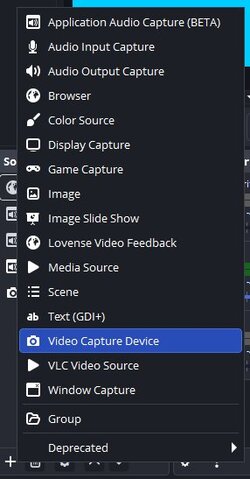
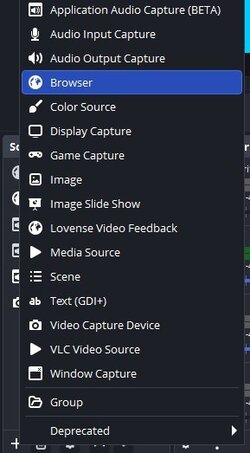
Hey, just go to the "Sources" dock and click add (+)
obs sources.jpg
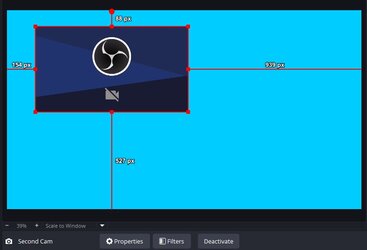
Then click Video Capture Device > Create New > Ok. Select the cam you're gonna use from the drop down list and that should be all. You've added a second cam, place it and resize it as you need.

obs sources2.jpg
 
I've seen broadcasters do this before and it's a pretty neat concept, just make sure you have it on lock how things will be divided. I'm sure you're both very honest people and would not do what other broadcasters have done (promise to transfer tokens to the other account and then it never happens).
 
  • Helpful!
Reactions: stormythunder
So it seems I didn't understand exactly what you want. Thought you only wanted to include a second cam but perhaps what you want is each of you at your own place and displaying the other person's cam on your screen. Is that it?
 
So it seems I didn't understand exactly what you want. Thought you only wanted to include a second cam but perhaps what you want is each of you at your own place and displaying the other person's cam on your screen. Is that it?
That is what they want and it can be done. I just can't remember how to do it. :(

I'll dig around in the FAQ for a bit.

Edit: Okay didn't find anything significant there. There was a broadcaster who frequently did this a few years ago, as a way to introduce new models he brought to the site. You could resize the feed and merge them, now it may have been bloatware as far as the actual site functionality went and perhaps they removed the ability.

Probably best just to email support directly. You'll have to be extremely precise in your wording in order to get to a human and not receive an AI response.
 
Last edited:
Ok then, it's actually easy if you use VDO.Ninja. You just have to add your cam there, you can see how to do it in this video from 45'' to 1'20''. You'll get an URL which you'll give to the other person to input on a Browser Source.
obs brow.jpg
Add (+) > Browser > Create New > Ok

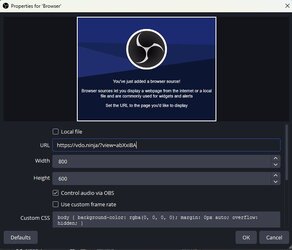
Input the URL of the cam (should be something like "https//vdo.ninja/?push=unique code") and that's it. Then the other person does the same and gives you their URL.
obs brow2.jpg
Be sure to check "Control Audio via OBS" so you have a slider and can adjust volume or mute it.

Just as Vixxen said, contact support to greenlight you. Guess that if you're allowed, you're gonna have to get verified on each other's accounts. Hope it helps.
 
  • Like
Reactions: Vixxen81