Only persons aged 18 or over may read or post to the forums, without regard to whether
an adult actually owns the registration or parental/guardian permission.
AmberCutie's Forum (ACF) is for use by adults only and contains adult content.
By continuing to use this site you are confirming that you are at least 18 years of age.
Hello I am an active cam model on CB but I would like to have the possibility of making more by streaming to other sites at the same time, I stream on OBS and want to continue with that software and use only 1webcam to broadcast to all sites, i have SC, Bonga and camsoda in mind. I see many people doing it from one webcam so if anyone would be sooooo kind to help/instruct me on how to split my OBS i will appreciate it sooo much
you can do this with OBS, just keep it mind it's an experimental 3rd party add-on. it's not harmful, just not polished or complete.. and could cause issues/errors or could be just fine.
homepage: https://sorayuki.github.io/obs-multi-rtmp/ The page is written in Japanese because it's a plugin originally build for vtubers. This is a plugin to streaming to multiple RTMP servers concurrently. It's able to share encoders with main...
obsproject.com
you need to make sure your computer can handle encoding the streams multiple times, if they are requiring different settings per site...
another option you have is using an RTMP service, there are a few available at various price ranges... i am not going to recommend any because i don't know them (also, perhaps soon i will be able to provide this service to some, but if i knew of one i would mention; google search if you like RTMP provider)
a few of the models on here will recommend Shinemodel, find it from google search, and they will vouch for it.. it uses a chromium browser to house all your stream chats and webcam output to the sites... using an RTMP service they provide free of charge.
just read over and understand the privacy policies on anything you sign up for online is the best advice i can give.
Hello. So I clicked on the link you provided at the bottom of your message and then clicked to download the zip. After that I have no clue what I should do. It just opens the file for me. Can you please help on what would be the next step thank you so much
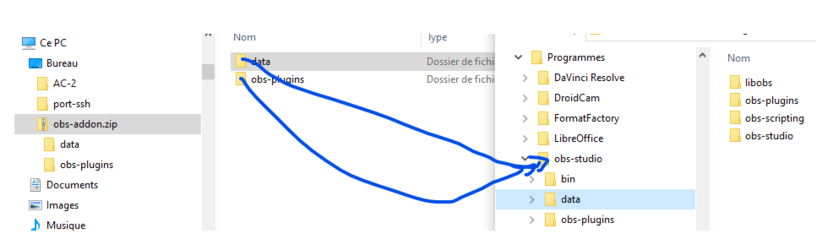
A OBS plugin has to be installed very simply by unzipping the folder in OBS installation folder.
The simplier way is to drag and drop the 2 zipped folders Data and Pluggin in the program folder
-1st find your obs studio install folder, usually : c:\programs\obs-studio
-then drag the 2 folder from the zip, like this :
(if you visit the author's pages, don't be afraid that all is in Japanese, the plugging seems translated in many languages... but I didn't try it)
Hello. So I clicked on the link you provided at the bottom of your message and then clicked to download the zip. After that I have no clue what I should do. It just opens the file for me. Can you please help on what would be the next step thank you so much
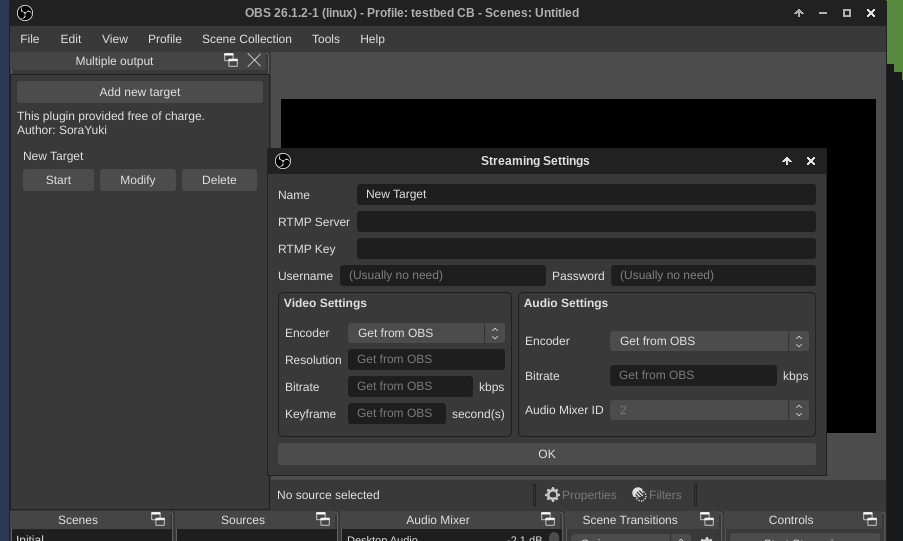
hopefully you added the plugin via DoD404's help. if you are still stuck there should be a new window "multiple output" now in OBS (mine is on the left) as shown here
and you need to click "add new target" to get the window you see on my screen shot. fill out this info, if different sites require different settings you can adjust. just remember adjusting and re-encoding can be very resource intense, and unless you have a strong computer and internet connection then it's probably best to just pass the same settings or use a remote RTMP provider. it is definitely worth trying. i will try to be around unfortunately i have not been well so have not been on.
This site uses cookies to help personalise content, tailor your experience and to keep you logged in if you register.
By continuing to use this site, you are consenting to our use of cookies.